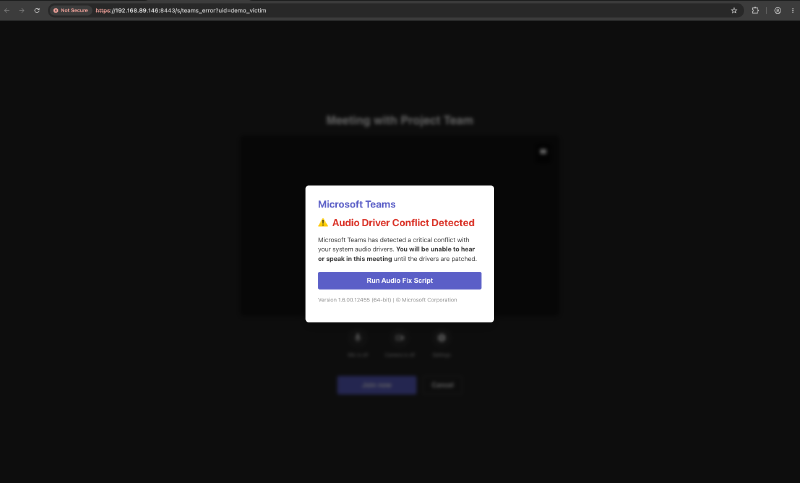
One sentence: Auto table construction makes every SQLite artifact on the endpoint a queryable table, fleet-mcp makes Fleet a tool catalog an agent can drive, and together they turn ClickFix hunting into something you state in English and let run.
| The hunt | Did anyone get ClickFixed—and how far did it go? Asked once, answered across the fleet |
| The substrate | ATC—point the agent at any on-disk SQLite file, hand it a SELECT, query the result like a native table |
| The hands | fleet-mcp—resolve hosts, read schemas, run live queries, label, run scripts, all as typed tools an agent calls |
| The autonomy | A loop: trigger fires, agent composes the SQL, fuses browser + filesystem + kernel evidence, reaches a verdict, acts |
| The output | OCSF event classes with decoded fields—reads as a verdict to the analyst, ships to the SIEM unchanged |
| The artifacts | One agent options file that creates the tables, one query pack that turns them into verdicts |
Vibe Hunting#
Threat hunting has always had a gap between the question and the query. The hunter knows what they want—did anyone reach a Teams-themed lure and then run something—and then spends forty minutes translating that into browser history SQL, epoch arithmetic, a filesystem scan, and a timeline stitched by hand across three consoles.
That gap is now closeable. Not because AI writes SQL—it has done that badly for two years—but because three specific things finally exist at the same time:
- ATC makes the endpoint’s SQLite artifacts queryable as first-class tables. The evidence is addressable.
- fleet-mcp makes Fleet’s API a typed tool catalog. The evidence is reachable by an agent, along with the actions that respond to it.
- OCSF gives the output a schema. The verdict is portable the moment it exists.
Put those together and the hunt becomes a conversation with a loop attached. You say what you want to know. The agent resolves the host, reads the table schema before writing SQL, composes the query, runs it scoped and bounded, decodes every raw integer into something with meaning, and hands back a verdict—then acts on it if you let it.
Hunters have started calling this vibe hunting. It is a joke that turned out to be load-bearing: the hunter’s job moves up a level, from writing the query to specifying the hunt and judging the result.
Some hunts that are one sentence each now:
- “Did anyone in Finance hit a Teams-themed domain in the last six hours, and did they interact with it or just load it?”
- “Show me every host where a browser visit was followed within five minutes by a new file in
/tmpor/Users/Shared.” - “Which hosts ran
osascriptwith a password dialog this week, and what did the user do in the browser ten minutes before?” - “Take this IOC domain from the intel feed and tell me who touched it, who acted on it, and who executed something afterwards.”
Each one is four to six fleet-mcp tool calls and one decode step. ClickFix is the worked example below because it exercises every part of the chain.
The substrate: ATC makes the endpoint queryable#
Fleet’s agent ships a couple of hundred built-in tables. Auto table construction lets you add your own without writing a line of code. Point it at a SQLite file, give it a SELECT, name the columns:
chrome_url_history:
  path: /Users/%%/Library/Application Support/Google/Chrome/%%/History
  query: >-
    SELECT urls.id id, visits.id visit_id, urls.url url, urls.title title,
    urls.visit_count visit_count, urls.last_visit_time last_visit_time,
    visits.visit_time visit_time, visits.visit_duration visit_duration,
    visits.transition transition
    FROM urls JOIN visits ON urls.id = visits.url
  columns: [id, visit_id, url, title, visit_count, last_visit_time, visit_time, visit_duration, transition]
chrome_url_history is now a table. The %% wildcards expand across every user and every browser profile on the host.
That is the unlock, and it is bigger than one browser. Anything an application persists to SQLite is now hunting surface:
| Table | What it opens up |
|---|---|
chrome_url_history | Navigation with transition type and dwell—visited versus interacted |
chrome_download_history | Download records with start time, referrer, originating tab, Safe Browsing verdict |
quarantine_items | LaunchServices quarantine events—what the OS tagged as coming from outside |
firefox_url_history | Same hunt, second browser, no new query logic |
edge_url_history | Same again on Windows (Edge for macOS was discontinued in April 2024) |
chrome_login_keychain | Which sites have stored credentials, for blast-radius questions after a stealer hit |
The bundled config at the bottom of this post ships the Chrome and Firefox tables for macOS and Windows, and the Edge tables for Windows. Extending it is a config change, not an engineering project: point at the file, write the SELECT, name the columns. Messaging app stores, editor state, VPN clients, endpoint agent databases—if it is SQLite, it is one YAML block away from being huntable.
The built-in catalog is a floor, not a ceiling. Most teams never find that out.
The hands: fleet-mcp turns Fleet into tools an agent can call#
fleet-mcp exposes Fleet’s API as a typed tool catalog: resolve a host from a fuzzy identifier, read a table’s schema, run a live query scoped to one host or a label, pull software inventory, check policy status, add a label, run a script.
The discipline that makes agent-driven hunting correct rather than confident is four steps, in this order:
- Resolve the host from whatever the trigger carried—hostname, serial, username, IP.
- Read the schema before writing SQL. ATC columns arrive as TEXT regardless of what SQLite stored. Reading the schema first is what makes the generated query return rows instead of silently returning zero.
- Run the query, scoped and time-bounded.
- Decode.
transition = 7becomesform_submitted. A microsecond counter becomes engaged for 3m16s. A pile of rows becomes a verdict with a severity.
Steps 2 and 4 are where an agent earns its seat. Fetching is easy—a shell script fetches. Being schema-correct going in and legible coming out is the part that used to require a human with tribal knowledge.
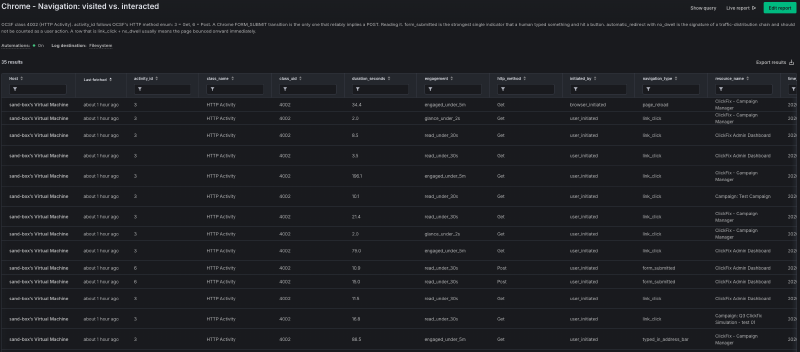
navigation_type, engagement and http_method are decoded from raw Chrome integers by the agent—the two form_submitted / Post rows are the ones that matter.The hunt, in four moves#
Move 1—visited, or acted?#
A history row means a page loaded. It does not mean a human did anything. Chrome records the difference in two columns: transition is a bitmask whose low byte is the core type (0 link click, 1 typed URL, 7 form submission) and whose high bits flag automatic redirects, and visit_duration is dwell in microseconds.
CASE
  WHEN CAST(transition AS INTEGER) & 255 = 7               THEN 'INTERACTED - submitted data to the page'
  WHEN CAST(transition AS INTEGER) & 3221225472 != 0       THEN 'PASSIVE - arrived via redirect, not a click'
  WHEN CAST(transition AS INTEGER) & 255 IN (0,1,2,5,9)
       AND CAST(visit_duration AS BIGINT) > 2000000        THEN 'ENGAGED - deliberate navigation with dwell'
  ELSE 'VISITED - page loaded, no interaction signal'
END AS verdict
form_submitted means a human typed something and hit a button. That single decoded column is the difference between an alert worth escalating and one worth logging—and it is the agent’s first branch point, which is what makes the rest of the loop cheap.
Move 2—fuse three views of the disk#
Three sources see what landed, and each one sees a different slice:
- Quarantine events (
quarantine_items)—what the OS tagged as arriving from outside, with an authoritative timestamp. - Chrome’s download records—the browser’s own view: start time, referrer, originating tab, Safe Browsing classification.
- A filesystem scan of the download and staging directories—everything that reached disk, whatever put it there.
Fusing them is the move. A file that shows up in the filesystem scan with a matching quarantine event and a Chrome record is a normal browser download with full provenance. A file that shows up only in the filesystem scan arrived outside the browser entirely—curl, osascript, a clipboard paste—and that is the ClickFix signature, stated as a join rather than a hunch.

clickfix_campaign_TestCampaign_… alongside an earlier TCC-ClickJacking-main.zip.The agent also reads provenance straight off the file. Every browser download carries com.apple.metadata:kMDItemWhereFroms (download URL and referrer) and a com.apple.quarantine xattr whose trailing field is the quarantine event UUID. Fleet’s agent parses both, so the join from file to event to originating URL is one query—full chain of custody, from the page that served it to the bytes on disk.

evidence_source so the fusion step knows where each row came from.Move 3—what executed#
Shell history, joined against users, attributes every pasted command to an account and classifies it on the way out: applescript_execution, clipboard_read, encoded_payload_decode, remote_script_piped_to_shell, persistence_mechanism, each with an OCSF severity.

users, shaped to OCSF 1007: an osascript dialog impersonating a system password prompt—applescript_execution, severity 5. The agent classified and scored it in the same pass that fetched it.EndpointSecurity process events are the richer source: every launch with its command line, parent PID, working directory, signing ID, team ID and code-signing flags. That is where a browser-spawned shell running curl | bash shows up with its whole lineage. Configure it once—events_expiry at 86400, events_max at 250000, a scheduled query shipping the events, and the ES entitlement granted through MDM—and the agent has real process telemetry to hunt across, not just a history file.
Move 4—one timeline#

The stages stitch into a single ordered view: the redirect hops into the lure, the deliberate click, the form submission, the file landing in a staging directory, the command that put it there. Reconciling Chrome’s microseconds-since-1601, LaunchServices’ seconds-since-2001 and the filesystem’s Unix epoch is exactly the bookkeeping an agent should carry so a hunter never does it by hand again.
OCSF is what makes the result portable. Navigation maps to HTTP Activity, downloads to Network File Activity (OCSF 4010, since superseded by File Hosting Activity), execution to Process Activity, each with decoded fields and a severity. The same output reads as a plain-language verdict to the analyst and ships to the SIEM unmodified.
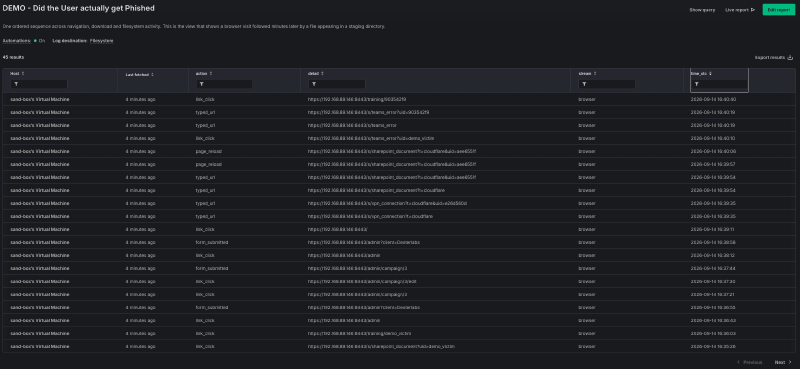
form_submitted actions—reconciled across three epochs so the sequence reads in order.Autonomy: the hunt as a loop#
Four moves, six live queries, one verdict column. Nothing in that needs a human until the verdict, so wrap it in a harness and let it run. Any agent runtime does: a scheduled cloud agent, an SDK loop, a /loop in your terminal, a SOAR step that calls an MCP client.

on trigger (IOC feed hit | DNS lookup to lure domain | EDR alert | scheduled sweep | hunter's sentence):

    host    = resolve_host(identifier)              # fuzzy name / serial / user / IP
    columns = describe_table("chrome_url_history")  # schema first, always

    nav = live_query(host, Q_NAVIGATION, timeout=90s)
    if nav.verdict in ("VISITED", "PASSIVE"):
        record(nav); exit()                         # most triggers stop here, cheaply

    disk = fuse(live_query(host, Q_QUARANTINE),
                live_query(host, Q_CHROME_DOWNLOADS),
                live_query(host, Q_FILESYSTEM_SCAN))

    exec = live_query(host, Q_SHELL_HISTORY) + live_query(host, Q_ES_PROCESS)

    verdict  = max_severity(nav, disk, exec)
    timeline = merge_ocsf(nav, disk, exec)          # one ordered, SIEM-ready sequence

    match verdict:
        case INTERACTED_ONLY:
            add_label(host, "clickfix-watch")
            hunt_cohort(domain=nav.lure_domain)     # who else touched it?
        case EXECUTION_CONFIRMED:
            add_label(host, "clickfix-confirmed")
            run_script(host, "collect_volatile.sh")
            emit_ocsf(timeline) ; page_human(timeline)
Four design choices make this a harness that survives contact with a real fleet:
Trigger on events, and fan out from there. One host per trigger, on demand—then let a confirmed hit widen the lens automatically. That hunt_cohort call is the interesting one: the first host’s lure domain becomes the input to a fleet-wide navigation query, and the loop re-enters itself for every host that touched it. One alert becomes a campaign map without anyone typing a second query.
Give a live ATC query 90 seconds. At distributed_interval: 60 that is the honest budget. Harnesses that time out at 30 seconds report failures on healthy hosts and then retry, which is how a hunt turns into a self-inflicted load test.
Make it idempotent. Key on host plus trigger event. The same IOC firing three times produces one investigation, one label, one page.
Let it escalate, not decide. Labels, evidence collection and volatile-state capture are additive and reversible—safe to run unattended. Process kills, file quarantine, session revocation and account lockout are one-way doors; the loop’s job there is to hand a decoded, evidence-linked verdict to a human or to a SOAR rule that has earned the trust. Fleet produces the high-confidence endpoint signal and the endpoint-side action, then hands off cleanly to whoever owns identity.
Where it goes next#
The same loop generalizes past ClickFix with no new machinery:
- Continuous sweeps. Run the navigation stage nightly against a label of high-risk users with a domain list from your intel feed. Confirmed hits promote themselves to full triage automatically.
- Cohort hunting. Every dynamic label is a hunting cohort. “Every host that visited this domain” becomes a live population you can watch, re-query, and measure over time.
- Detonation feedback. Run the same pack against a sandbox host after detonating a sample, and you get the exact artifact set the technique leaves behind—the query pack writes its own ground truth.
- Coverage proof. Because every output is OCSF, the loop’s results are countable. How many hosts were swept, how many were clean, how long from trigger to verdict—the answer is a query, not a status meeting.
Read this part twice, depending on who you are#
If you are a CISO: the number that moves is time-to-verdict. The first ten minutes of a phishing investigation are gathering, not judgment, and gathering is the part that scales to zero marginal cost here. What you are buying is not a robot analyst—it is a tier-2 investigation that starts in seconds, runs identically at 3 AM and 3 PM, produces the same evidence package every time, and stops at the boundary you set. Autonomy is graduated on purpose: label and collect unattended, escalate one-way actions to a human. The coverage question—how many of our endpoints could we actually answer this question on right now?—becomes a query against your own fleet instead of a vendor’s claim.
If you build security products: the interesting part is the composition, not the demo. ATC is a config-defined table. fleet-mcp is a typed tool catalog. OCSF is the wire format. None of the three knows about ClickFix—the technique-specific part is these six queries and a verdict function, which is the smallest possible surface for a new detection. That is what a platform looks like when the primitives are right: new technique, new queries, same substrate, same tools, same output schema, no new integration.
If you hunt: your job moves up a level. The SQL is still yours—you review it, you own the decode logic, you decide what severity_id 5 means—but you stop being the transport layer between the question and the answer. Point the loop at an intel feed and let it bring you the verdicts. Then spend the reclaimed hours on the hunts nobody has written a query for yet. That is the vibe.
The through-line#
ClickFix turns the user into the execution vector, which scatters evidence across exactly the seams where hunting is slowest—browser, filesystem, shell, kernel. ATC reaches into all of them from one agent. fleet-mcp gives an agent hands. OCSF makes the answer portable the moment it exists. And once the verdict is a value in a column, a loop can branch on it.
None of this is a new data source. It is the data that was already sitting on the endpoint, made queryable, made legible, and then made unattended.
Run it yourself#
Both artifacts, validated against the current Fleet table schema:
atc-clickfix-fleet-agent-options.yml—the agent options that create the tables.chrome_url_historywithvisit_idso redirect chains resolve,chrome_download_historywith the fulldownloadscolumn set plus the finaldownloads_url_chainsURL,quarantine_items,firefox_url_history,chrome_login_keychain, and the Edge equivalents on Windows—plusevents_expiryat 86400 andevents_maxat 250000 for EndpointSecurity.atc-clickfix-ocsf-queries.md—the full query pack: every stage, every OCSF mapping, every integer decoded, ready to hand to an agent as its tool prompt or to run by hand.
Start with the agent options. Everything else is downstream of the tables existing.
Related: the ClickFix threat brief and detection pack for the atomic indicators this hunt builds on, and the Fleet MCP manifesto for what fleet-mcp is and what it deliberately will not do.
Built something on top of this—a new ATC table, a better decode, a harness worth stealing? Open an issue or a PR.