One sentence: your fleet has an AI software layer that your existing tools can’t see —
agentic-detectorputs a queryable osquery table over it.
| What it is | A cross-platform osquery extension (Go) that exposes AI tooling as a queryable table |
| What it detects | MCP servers, agent CLIs, AI desktop apps, IDE plugins, AI browser extensions, live AI/MCP network sockets, agent instruction files |
| How it surfaces risk | SHA-256 fingerprints + risk_flags covering supply-chain exposure, inferred capabilities, plaintext secrets, agent autonomy posture, prompt injection |
| What it won’t do | Execute discovered binaries, connect to MCP servers, emit secret values, or take any remediation action |
| Deploy path | Fleet Premium (fleetd/orbit auto-distribution) or local osqueryi in under five minutes |
| Repo | github.com/karmine05/agentic-detector |
The visibility gap#
Traditional endpoint tooling — EDR, MDM, even osquery’s built-in tables — was built for a world where software runs from an installer, a package manager, or an IT-approved image. The AI tooling layer doesn’t work that way.
An MCP server can be npx-fetched on first run, no installation step. An AI agent CLI can be pip install-ed into a user-owned virtualenv. A CLAUDE.md file can be dropped anywhere in a project tree and immediately start shaping what an AI agent is allowed to do on that machine. None of these show up in MDM enrollment records. Very few show up as installed applications. Some don’t even appear as persistent processes.
At the same time, these tools carry real exposure:
- An MCP server launched via
npx <package>@latestfetches and executes code from npm at every restart. The package version is not pinned — what runs today may not be what runs tomorrow. - An MCP server with inferred
shell_execcapability wired to a Claude Desktop config can run arbitrary shell commands on behalf of an AI agent. The user who wired it up may not have read the docs that far. - A
CLAUDE.mdfile that’s world-writable can be modified by any local user to inject instructions the AI agent will follow. - A running agent with
--dangerously-skip-permissionsin its process flags is operating without the confirmation dialogs that exist for a reason.
None of this is hypothetical. These configurations exist on developer endpoints right now. The question is whether you know about them.
The ai_tools table#
agentic-detector adds one table to osquery: ai_tools. Every row is an AI tool — presence in the table is the signal, not a column called is_ai.
A type column separates the seven row types:
type | What the row represents |
|---|---|
mcp_server | An MCP server declared in any client config (Claude Desktop, Claude Code, Cursor, Windsurf, VS Code, Zed, Cline, Roo, Continue) and/or a running MCP server process |
ide_plugins | An installed AI editor plugin (VS Code family incl. Cursor/Windsurf/VSCodium/Trae/Antigravity/code-server, JetBrains, Zed, Sublime, Neovim/Vim, Emacs) |
agents | An AI agent CLI or harness. Catalog tools (Claude Code, Gemini CLI, Codex, Grok, aider, goose, opencode, Cline, Continue, cursor-agent, Amazon Q/Kiro) always emit; unknown CLIs, harnesses, and custom agents (e.g. Hermes, OpenClaw-class) can still surface through multi-signal confidence/evidence scoring — see below |
apps | An installed AI desktop app (Claude Desktop, ChatGPT, Ollama, LM Studio, Jan, GPT4All, Msty, AnythingLLM, Perplexity, Cursor, Windsurf, Antigravity) |
sockets | A live AI/MCP network socket — local inference/MCP listener or outbound AI/MCP egress |
agent_instruction | An agent instruction file the AI auto-loads (CLAUDE.md, AGENTS.md, GEMINI.md, .cursorrules, .github/copilot-instructions.md, Cursor .mdc rules) |
browser_extension | An AI extension installed in a Chromium-family browser (Chrome, Edge, Brave, Arc, Opera, Vivaldi, Chromium, Comet, Dia) or a Gecko-family browser (Firefox, Zen, LibreWolf, Waterfox) — AI-native browsers like Comet and Dia also appear as apps rows |
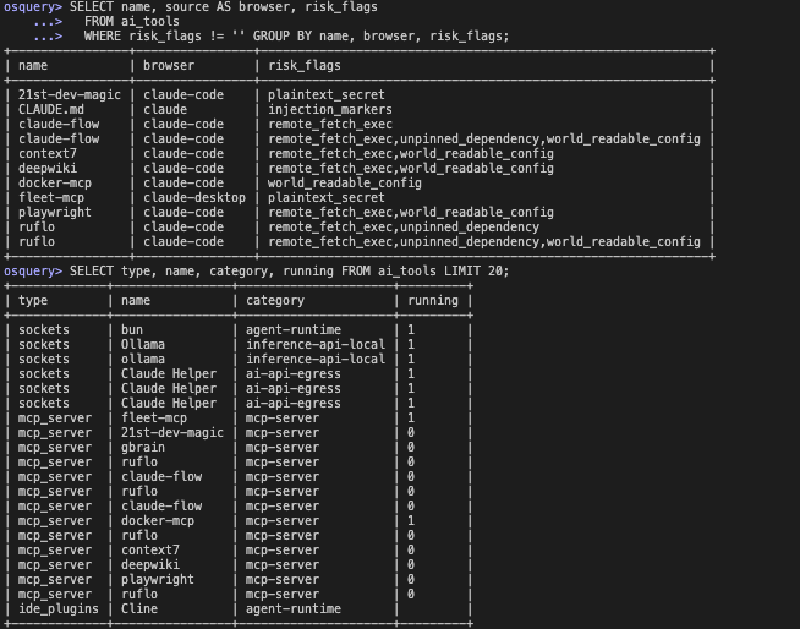
The full column set: type, name, identifier, category, location, source, version, path, endpoint, running, pid, port, risk_flags, sha256, confidence, evidence, uid, username, detail.
The detail column is compact JSON carrying type-specific extras: transport, args, env_keys (names only — never values), capabilities, launch_hash, permission_mode, markers, and others depending on type.
Common columns are shared field slots, but only some are populated per type — the rest are empty for that row:
| Column | mcp_server | ide_plugins | agents | apps | agent_instruction | browser_extension | sockets |
|---|---|---|---|---|---|---|---|
name | ✓ | ✓ | ✓ | ✓ | ✓ | ✓ | ✓ |
identifier | server name | plugin id | binary | bundle id | tool | extension id | service |
category | mcp-server | AI category | agent category | — | agent-instruction | ✓ | ✓ |
location | local/remote | local | local | local | local | local | local/remote |
source | client | editor | install method | platform source | tool | browser | direction |
version | — | ✓ | ✓ | ✓ | — | ✓ | — |
path | config path | install path | ✓ | ✓ | ✓ | ✓ | process path |
endpoint | remote URL | — | — | — | — | — | remote addr:port |
running, pid | ✓ | — | ✓ | ✓ | — | — | ✓ |
port | listening port | — | — | API port | — | — | local port |
risk_flags | ✓ | — | ✓ | — | ✓ | ✓ | — |
sha256 | ✓ | — | ✓ | ✓ | ✓ | ✓ | — |
confidence, evidence | — | — | ✓ | — | — | — | — |
uid, username | ✓ | ✓ | ✓ | — | ✓ | ✓ | username only |
Multi-signal agent detection#
agents is the one type that isn’t purely name-match. A shared evidence engine fuses tool homes (~/.grok, ~/.hermes), binaries, package/framework fingerprints, workspace shape (skills + MCP + instruction packs), and live processes. Known catalog CLIs always emit a row at confidence = 100. Unknown CLIs, harnesses, and custom agents can still surface if enough independent signals line up — with a confidence score (0–100) and an evidence CSV (e.g. catalog,binary,running,tool_home) explaining why.
| Band | Range | Meaning |
|---|---|---|
| Known | 100 | Catalog / allowlisted agent CLI |
| High | 70–99 | Multi-signal (e.g. tool home + binary + running) |
| Medium | 40–69 | Strong workspace shape offline, or framework fingerprint alone |
| Low (still emitted) | 30–39 | Borderline multi-signal |
| Not emitted | — | Name-only, or a single weak marker (e.g. only AGENTS.md) |
Name matching alone never creates a row — that’s what keeps this from turning into a keyword-matching false-positive machine. For a strict inventory of high-trust rows only:
SELECT name, type, confidence, evidence FROM ai_tools WHERE confidence >= 80;One design choice worth calling out: the extension enumerates all home directories on the host (/Users/*, /home/*, /root, C:\Users\*) — not just the daemon account. When Fleet’s fleetd runs it as root, you see the full multi-user picture. Running unprivileged gives you partial rows on homes you can’t read, rather than a silent miss.
What risk_flags tells you#
Every row carries a risk_flags column — a comma-separated set of tokens that surface specific exposures. An empty string means none were found.
| Flag | Kind | What it means |
|---|---|---|
remote_fetch_exec | mcp_server | Server is launched via npx/uvx/bunx/pnpx — fetches and executes remote code at every start |
unpinned_dependency | mcp_server | That fetched package is unpinned or @latest — mutable supply chain |
mcp_shell_exec | mcp_server | Inferred capability: this server can run shell commands |
mcp_fs_write | mcp_server | Inferred capability: this server can write to the filesystem |
plaintext_secret | mcp_server | A secret-shaped env var name is set inline in the config (name only is flagged — the value is never read or emitted) |
world_readable_config | mcp_server | The declaring config file is group/other-readable |
cleartext_endpoint | mcp_server | Remote MCP reached over plain http:// |
bypass_permissions | agents | Agent config declares auto-approve autonomy posture |
auto_accept_edits | agents | Same family — auto-accept without confirmation |
skip_permissions_runtime | agents | Agent is running with an unattended flag (--dangerously-skip-permissions) right now |
injection_markers | agent_instruction | File contains prompt-injection or exfiltration phrases — see detail.markers |
hidden_unicode | agent_instruction | Zero-width or Unicode-tag characters present — used to smuggle hidden instructions |
world_writable | agent_instruction | File is world-writable — any local user can modify what the agent is told to do |
broad_host_permissions | browser_extension | Manifest grants <all_urls> / *://*/* host access — the extension can read and modify every site the user visits (AI data exfiltration surface) |
sideloaded_unverified | browser_extension | Installed outside the browser store — Chromium: not from_webstore, unpacked, or policy-forced; Gecko: unsigned, temporary, or foreignInstall — no store review occurred |

Capability inference is static. The extension reads the known-server knowledge base and infers what a given MCP server is capable of from its name and configuration — it never connects to or launches the server to find out. That’s an intentional no-exec posture: discovering what a suspicious binary can do by running it isn’t detection, it’s detonation.
Example queries#
These run in the Fleet live query console or in a local osquery> shell. Filtering on type is cheap — constraint pushdown means only the relevant collectors run.
Full AI inventory on a host:
SELECT type, name, category, running, risk_flags
FROM ai_tools
ORDER BY type, name;
Remote MCP servers only (the highest-risk surface):
SELECT name, source, endpoint, risk_flags
FROM ai_tools
WHERE type = 'mcp_server'
  AND location = 'remote';
MCP servers with supply-chain exposure:
SELECT name, path, risk_flags
FROM ai_tools
WHERE type = 'mcp_server'
  AND risk_flags LIKE '%remote_fetch_exec%';
Agents running in auto-approve mode right now:
SELECT name, pid, path, risk_flags
FROM ai_tools
WHERE type = 'agents'
  AND (
    risk_flags LIKE '%bypass_permissions%'
    OR risk_flags LIKE '%skip_permissions_runtime%'
  )
  AND running = '1';
Agent CLIs with multi-signal confidence, highest first:
SELECT name, category, confidence, evidence, running, pid, path
FROM ai_tools
WHERE type = 'agents'
ORDER BY confidence DESC;
Candidate agents only — shadow IT, custom harnesses, not in the known catalog:
SELECT name, path, confidence, evidence
FROM ai_tools
WHERE type = 'agents'
  AND confidence < 100;
Agent instruction files with injection markers or hidden unicode:
SELECT name, path, username, risk_flags, sha256
FROM ai_tools
WHERE type = 'agent_instruction'
  AND (
    risk_flags LIKE '%injection_markers%'
    OR risk_flags LIKE '%hidden_unicode%'
  );
Live AI network sockets — what’s phoning home:
SELECT name, category, endpoint, port, pid
FROM ai_tools
WHERE type = 'sockets';
AI browser extensions — inventory by browser and profile:
SELECT name, source AS browser, category,
  json_extract(detail, '$.engine') AS engine,
  json_extract(detail, '$.profile') AS profile,
  version
FROM ai_tools
WHERE type = 'browser_extension';
Browser extensions with risky permissions or installed outside the store:
SELECT name, source AS browser, risk_flags,
  json_extract(detail, '$.from_webstore') AS from_webstore,
  json_extract(detail, '$.signed_state') AS signed_state
FROM ai_tools
WHERE type = 'browser_extension'
  AND risk_flags != '';
Row count by type — quick inventory shape:
SELECT type, count(*) AS count
FROM ai_tools
GROUP BY type;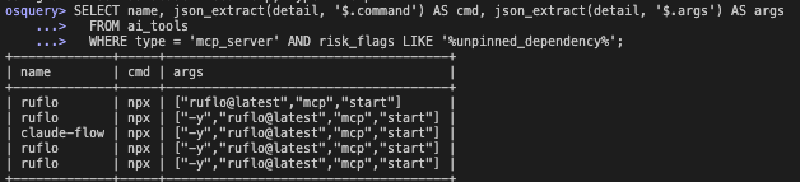
How detection works under the hood#
There are four mechanisms running together each time a query hits the table.
Browser extensions. Per-profile enumeration across Chromium (Extensions/<id>/<version>/manifest.json cross-referenced with the profile’s Preferences/Secure Preferences for install provenance) and Gecko (extensions.json plus the .xpi archive). Localized extension names (__MSG_* i18n keys) are resolved from _locales. Capability and permission risk is read statically from the manifest — no extension is loaded or executed.
Config parsing. The extension reads every known MCP client config format — JSON for Claude Desktop/Code, YAML and JSON for VS Code, Cursor, Windsurf, Zed, Cline, Roo, and Continue. It handles VS Code’s servers key separately from everyone else’s mcpServers, Zed’s nested command object, and per-project configs in .mcp.json, .cursor, .vscode, and .roo directories via a bounded walk of common dev roots.
Process and connection snapshot. One gopsutil snapshot per query feeds liveness data (running, pid), fills listening port fields, and generates the sockets type rows. The snapshot is shared across all collectors in a single query — it doesn’t run once per type.
Classification knowledge base. internal/classify/kb.json (embedded at build time) maps known extension IDs, process command-line markers, inference ports, and MCP server capability tags to categories. Egress attribution is process-first: if the process owning a connection is an AI or agent tool, the socket is attributed as AI traffic regardless of destination IP. No hostname allowlists, no brittle IP matching.
Integrity fingerprints. Every MCP config, agent binary, app binary, and instruction file gets a SHA-256 hash in the sha256 column. MCP server rows also carry a launch_hash in detail — a hash of the command, args, and URL — so you can detect a silently mutated launch vector (a rug-pull on the server’s actual behavior) by diffing snapshots over time in your SIEM.
Try it locally in five minutes#
If you want to run it against your own machine before deploying, you need osqueryi on PATH (brew install --cask osquery on macOS) and either a pre-built binary from the releases page or a build from source (make build-all).
macOS:
# Download and clear quarantine (binary is unsigned)
gh release download v0.3.0 -R karmine05/agentic-detector \
  -p 'agentic_detector_macos.ext'
xattr -d com.apple.quarantine agentic_detector_macos.ext

# Quick row-count sanity check
osqueryi --allow_unsafe \
  --extension "$PWD/agentic_detector_macos.ext" \
  --extensions_require=agentic_detector \
  --extensions_timeout=10 \
  "SELECT type, count(*) FROM ai_tools GROUP BY type"
--extensions_require is important for one-shot queries — without it, osqueryi exits before the extension finishes registering and you get no such table: ai_tools. In an interactive osquery> session it’s not needed.
For a full interactive session: make run (or make run-root to see all users’ homes).
What it tells you that your current stack doesn’t#
A few concrete examples of things ai_tools surfaces that don’t appear elsewhere:
An npx-launched MCP server doesn’t exist as an installed application. It might not even have a persistent process — it may only run when Claude Desktop is open. MDM won’t see it. ps might not either. ai_tools catches it from the config file.
An AI agent CLI installed via pip install --user lands in ~/.local/bin. It’s not in MDM’s application inventory. It doesn’t appear in Homebrew. ai_tools catches it from known binary names and install paths.
A CLAUDE.md in a project directory with world-writable permissions is a hijack surface — any user on the system can modify what Claude is told to do in that project. No existing tool looks for this. ai_tools surfaces it as world_writable on an agent_instruction row.
An agent running with --dangerously-skip-permissions in its process flags is operating in a mode where it won’t ask the user before executing code or writing files. That runtime posture shows up as skip_permissions_runtime in risk_flags and the process is live in running = '1'.
An AI browser extension installed outside the Chrome Web Store — sideloaded by a developer, pushed via enterprise policy, or dropped by an installer — carries no store review guarantee. It may also declare <all_urls> host permissions, meaning it can read and modify every page the user visits. Neither of these facts appears in MDM inventory. ai_tools surfaces both as sideloaded_unverified and broad_host_permissions on a browser_extension row, with the profile path so you know exactly where it lives.
What it deliberately won’t do#
The extension is detection-only. It reads, parses, and hashes. It does not execute discovered binaries to check versions. It does not connect to MCP servers to enumerate their live tool catalog. It does not read environment variable values (only names). It does not write anything to disk.
That constraint matters operationally: if you’re running this as root via fleetd on production endpoints, “detection-only” is not a marketing qualifier — it’s the guarantee that the extension itself won’t become an attack surface.
Get it#
Repo: github.com/karmine05/agentic-detector
The repo is public. Prebuilt binaries for macOS (universal), Linux (amd64), and Windows (amd64) are attached to the v0.3.0 release with SHA256SUMS for integrity verification.
Build from source: make build-all produces Fleet-named binaries in ./build/. The extension is written in Go, passes govulncheck and gosec clean, and uses a pinned toolchain (go 1.26.4).
If you find false positives, missing tools, or gap in the knowledge base — open an issue or a PR. The classification KB is a JSON file; adding a new MCP server or agent CLI is a small diff.